Mybatis练习
目标
- 能够使用映射配置文件实现CRUD操作
- 能够使用注解实现CRUD操作
1.7 修改
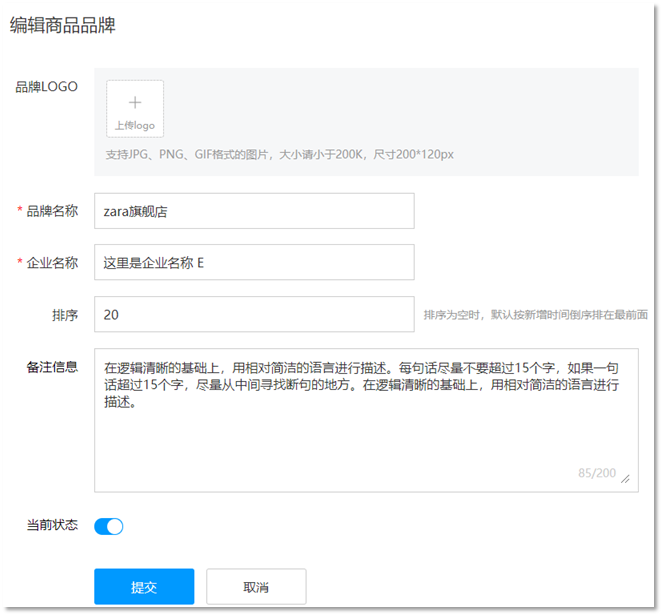
如图所示是修改页面,用户在该页面书写需要修改的数据,点击 提交 按钮,就会将数据库中对应的数据进行修改。注意一点,如果哪儿个输入框没有输入内容,我们是将表中数据对应字段值替换为空白还是保留字段之前的值?答案肯定是保留之前的数据。
接下来我们就具体来实现
1.7.1 编写接口方法
在 BrandMapper 接口中定义修改方法。
xxxxxxxxxx


 /**   * 修改   */void update(Brand brand);
上述方法参数 Brand 就是封装了需要修改的数据,而id肯定是有数据的,这也是和添加方法的区别。
1.7.2 编写SQL语句
在 BrandMapper.xml 映射配置文件中编写修改数据的 statement。
xxxxxxxxxx


<update id="update">    update tb_brand    <set>        <if test="brandName != null and brandName != ''">            brand_name = #{brandName},        </if>        <if test="companyName != null and companyName != ''">            company_name = #{companyName},        </if>        <if test="ordered != null">            ordered = #{ordered},        </if>        <if test="description != null and description != ''">            description = #{description},        </if>        <if test="status != null">            status = #{status}        </if>    </set>    where id = #{id};</update>
set 标签可以用于动态包含需要更新的列,忽略其它不更新的列。
1.7.3 编写测试方法
在 test/java 下的 com.itheima.mapper 包下的 MybatisTest类中 定义测试方法
xxxxxxxxxx
public void testUpdate() throws IOException { //接收参数 int status = 0; String companyName = "波导手机"; String brandName = "波导"; String description = "波导手机,手机中的战斗机"; int ordered = 200; int id = 6; //封装对象 Brand brand = new Brand(); brand.setStatus(status); // brand.setCompanyName(companyName); // brand.setBrandName(brandName); // brand.setDescription(description); // brand.setOrdered(ordered); brand.setId(id); //1. 获取SqlSessionFactory String resource = "mybatis-config.xml"; InputStream inputStream = Resources.getResourceAsStream(resource); SqlSessionFactory sqlSessionFactory = new SqlSessionFactoryBuilder().build(inputStream); //2. 获取SqlSession对象 SqlSession sqlSession = sqlSessionFactory.openSession(); //SqlSession sqlSession = sqlSessionFactory.openSession(true); //3. 获取Mapper接口的代理对象 BrandMapper brandMapper = sqlSession.getMapper(BrandMapper.class); //4. 执行方法 int count = brandMapper.update(brand); System.out.println(count); //提交事务 sqlSession.commit(); //5. 释放资源 sqlSession.close();}
执行测试方法结果如下:

从结果中SQL语句可以看出,只修改了 status 字段值,因为我们给的数据中只给Brand实体对象的 status 属性设置值了。这就是 set 标签的作用。